
Developer Tools
AI Coding Tools Pricing Guide
Compare AI coding assistants by cost structure, seat controls, privacy posture, and developer workflow fit.
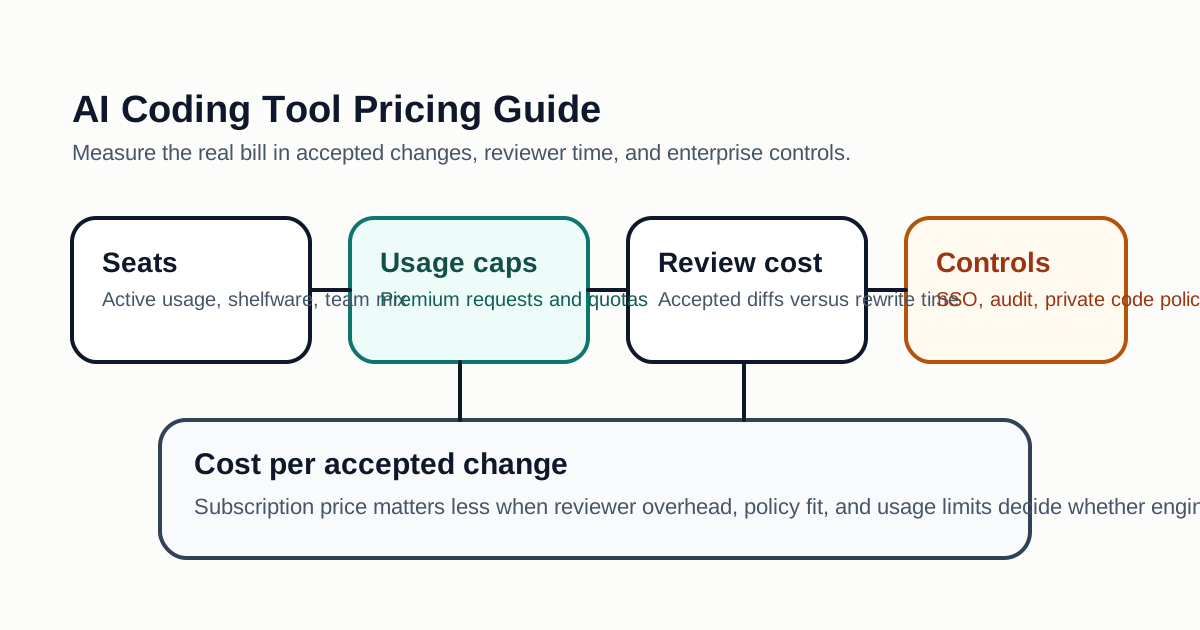
AI coding assistants rarely compete on subscription price alone. The real cost depends on how many engineers use the assistant every day, whether the tool can access private repositories safely, how often it burns through usage quotas, and whether it reduces review time instead of simply generating more code.
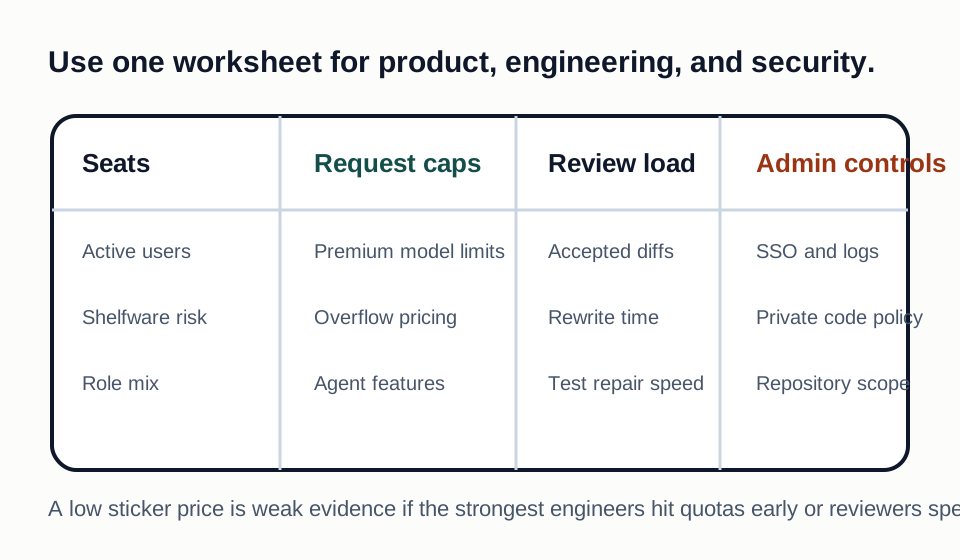
What To Compare Before Paying
Start with the billing unit. Some tools bill per developer seat, some meter premium model requests, and some bundle usage into plans that look simple until a team starts using agents, codebase indexing, or cloud workspaces. A low monthly plan can become expensive if senior engineers repeatedly hit model limits during debugging or large refactors.
The second factor is repository context. A tool that understands a monorepo, build graph, test failures, and local conventions may save more money than a cheaper assistant that only completes snippets. For production teams, the value usually appears in fewer review cycles, faster test fixes, and better onboarding for unfamiliar modules.
Privacy and administrative controls also change the total cost. Enterprise plans often add SSO, policy controls, audit logs, IP protections, and data handling commitments. If those controls are required by your customers, compare the paid business tier directly instead of using individual-plan prices as the anchor.
Practical Evaluation Matrix
Use a small internal scorecard before committing to annual billing:
| Area | Why It Matters | What To Test |
|---|---|---|
| Codebase context | Determines whether the assistant can reason across files | Ask it to fix a bug that touches tests and implementation |
| Review quality | Prevents generated code from increasing reviewer load | Compare PR comment volume before and after the trial |
| Usage limits | Hidden limiter on daily productivity | Track premium request exhaustion during normal work |
| Security controls | Needed for customer trust and compliance | Verify SSO, data retention, and admin policy options |
| IDE fit | Adoption depends on low friction | Test with the editors your team already uses |
| Cost per shipped change | Better than cost per seat | Divide monthly spend by merged, accepted AI-assisted changes |
Recommended Buying Workflow
Run a two-week trial with a representative set of engineers: one senior maintainer, one mid-level product engineer, one backend-heavy developer, and one engineer new to the codebase. Give each person the same tasks: fix a failing test, explain a legacy module, write a migration helper, and review generated code.
Do not measure only lines generated. Track accepted diffs, time to first useful patch, number of rework cycles, and whether the final code matches local style. If a tool produces large diffs that senior reviewers must rewrite, it is not cheaper just because the subscription is lower.
Red Flags
Be careful with tools that cannot clearly explain data usage, lack repository-level permission controls, or make it difficult to disable training on private code. Also avoid rolling out an assistant to every engineer before you know whether it helps your actual codebase. A pilot with hard metrics is cheaper than an organization-wide subscription that becomes shelfware.
Pricing Scenarios To Model
Model at least three rollout scenarios before choosing a plan. The first scenario is a small pilot with five to ten active developers and no annual commitment. This shows whether the tool is useful for your real repositories without turning a trial into a procurement decision. The second scenario is a team rollout for one product area, including administrators, security reviewers, and the engineers who will actually use the assistant each day. The third scenario is a full engineering rollout with enterprise controls, SSO, audit logs, private-code settings, and support expectations.
For each scenario, estimate the monthly cost per active engineer rather than per purchased seat. AI coding tools often look inexpensive when every seat is assumed to be active, but shelfware changes the economics quickly. If only half the licensed developers use the assistant every week, the effective cost per active user doubles. Also track whether usage limits are high enough for senior engineers working on large debugging or refactoring tasks, because the most valuable users may also be the ones most likely to hit premium request caps.
Cost Per Accepted Change
A better metric than subscription price is cost per accepted change. Count the number of AI-assisted changes that were merged without major rewrite, then compare that number with the monthly spend. This does not need to be perfect. A lightweight estimate can still reveal whether the assistant is producing production-ready work or simply creating drafts that reviewers must repair.
For example, if a team spends $600 in a month and gets 40 accepted AI-assisted changes, the rough cost is $15 per accepted change before including reviewer time. If the same tool causes reviewers to spend an extra 30 minutes on each large generated diff, the real cost is higher. If it helps a new engineer understand a legacy module two days faster, the value may be far higher than the subscription price. The point is to connect pricing to engineering outcomes.
Procurement Questions
Ask vendors direct questions before committing to a business or enterprise plan. Can administrators disable training on private code? Can the tool be limited to approved repositories? Are prompts, completions, repository indexes, and telemetry retained, and for how long? Can the company export usage data by team? Does the vendor offer indemnity or intellectual-property protections for business customers? What happens when a developer leaves the company?
These questions matter because AI coding assistants sit close to source code, credentials, architecture decisions, and customer-specific implementation details. The cheapest plan may be fine for personal projects but unsuitable for a company that sells to enterprise customers. A pricing comparison should therefore include risk reduction, compliance fit, and administrative maturity.
Bottom Line
For most teams, the winning AI coding tool is the one that reduces review time and bug-fix latency without weakening security controls. Compare price, but buy on workflow fit, repository understanding, and administrative maturity.
Decision Checklist For AI Coding Tools Pricing Guide
Use this guide as a decision filter before a sales call, trial, or migration plan. For AI Coding Tools Pricing Guide, the practical question is whether the topic connects AI coding tools pricing, developer tools, buying guide to a measurable workflow outcome. A good decision should improve delivery speed, quality, cost control, or operational confidence without creating hidden review, security, or migration work.
- The platform reduces review cycles, debugging time, release risk, or operational uncertainty for a defined engineering team.
- Usage, traces, errors, and cost can be attributed to projects or workflows without spreadsheet cleanup.
- The tool fits current repositories, issue trackers, CI pipelines, and incident workflows with limited custom glue code.
Pilot Plan
A useful pilot is small enough to finish quickly but realistic enough to expose integration, data, workflow, and pricing issues. Avoid demo-only tests. The trial should use real tasks, real constraints, and a baseline from the current process so the team can decide with evidence instead of impressions.
- Select one repository or production workflow where the current pain is already visible.
- Measure baseline cycle time, escaped defects, alert noise, or manual review effort before enabling the tool.
- Ask engineers to record where the tool helped, where it interrupted flow, and where output needed rework.
Metrics To Track
Track metrics that connect AI Coding Tools Pricing Guide to outcomes a budget owner and an engineering owner can both understand. A tool can look impressive in a demo and still fail if usage is low, quality is uneven, or the cost model changes under real workload volume.
- Cycle time from task start to accepted change or resolved incident.
- Number of manual handoffs, review comments, escaped defects, or repeated debugging steps.
- Monthly cost by active team, repository, project, or production workflow.
Budget And Risk Review
Commercially useful AI tooling decisions should include the subscription or API price, but they should also include support load, review time, observability, privacy controls, switching cost, and the cost of wrong or low-quality output. Treat the first estimate as a working model and update it with production evidence.
- Validate SSO, audit logs, role-based permissions, retention settings, and export behavior before annual billing.
- Check whether pricing is tied to seats, events, stored traces, indexed code, or premium model calls.
- Confirm the team can continue operating if the vendor has an outage or changes pricing.
Review developer-tool purchases after two sprints and after one release. Keep the tool only if the measured workflow gain is visible to both engineers and the budget owner.
Editorial note
AI Jupyter writes independent guides for technical readers. Product details, pricing, and feature names can change, so readers should verify commercial terms on the official vendor site before buying.
Reviewed by the AI Jupyter Editorial Team.